Showing posts with label ubuntu. Show all posts

Wednesday, January 11, 2012

Flipping Vertical Scrolling Behavior in X Windows

I've grown used to Mac OS "natural scrolling" on my trackpad.  So when I recently set up a few ubuntu netbooks, for a quick lab experiment, I wanted to have their trackpads behave the same.  It's actually pretty simple to tell X windows to flip 'em.

Short story, on a completely stock ubuntu, (and should work for anything) this will flip your scrolling:
  • open a terminal
  • run `echo "pointer =  1 2 3 5 4 6 7 8 9 10 11 12" >> ~/.Xmodmap`
  • logout of your X windows session.
  • log back in.
  • ta-da.
Long story, since the days of the dinosaurs, X Windows has been really nice about letting you remap your mouse keys .. southpaws would frequently swap their left and right buttons.  The `xmodmap` command provides an interface for this stuff.  Try `man xmodmap` and `xmodmap -help` for more details.  The above instructions just append a custom button setting to the rc file that xmodmap evaluates at log in.

Up and down scroll are considered physical buttons 4 and 5, respectively.  The "pointer = " statement above has 4 and 5 swapped.  Simple as that.

Use `xmodmap -pp` to display your current button mappings, and `xmodmap -e "pointer = default"` to reset to normal.  If you want to suss out where all of your buttons are, launch `xev` to see what events X is handling .. look for the ButtonPress event and note the "button" attribute.

Saturday, November 5, 2011

Mounting an iDisk on Linux (Quick and Dirty)

Here's how to get your iDisk mounted in your home directory on a linux machine.  You'll need to have sudo privileges.  Also, you'll need to type your iDisk username and password by hand, when prompted.  You could automate all of this quite nicely, but I'm only interested in an as-needed one-liner that I'll copy and paste (or script).

First-time, you'll need the davfs2 package installed.  If you're on debian (ubuntu) apt already knows where it is.  If you're on redhat (centos) you'll need to add Dag's rpmforge repo, before yum will be able to find davfs2.

  sudo apt-get davfs2  # for debian/ubuntu users.
  sudo yum install davfs2  # for redhat/centos users who have rpmforge enabled.
  # if yum can't find it, you need to install the rpmforge repo from http://repoforge.org/use/

Then, you can issue this one-liner to make a mountpoint (fine if it exists already); and mount your idisk on it, owned by you.  (You might make this is a script in your home directory, for easy access.)

  sudo mkdir $HOME/idisk ; \
  sudo mount -t davfs https://idisk.me.com/YOURICLOUDUSERNAME \
    $HOME/idisk -o rw,uid=`id -u`,gid=`id -g`

After, when you're done, unmount your idisk, to make sure that all of your changes have been uploaded.

  sudo umount $HOME/idisk

Hopefully this is a good starting point for someone who wants to automate this when a user logs in.  You may need/want to have FUSE involved in that.  I'm not talking about just adding it to /etc/fstab .. there's a "right" way to do it magically per user, and only when they're logged in.  Extra points for letting it remember your password.  Please add a comment if you've done it!

Tuesday, September 6, 2011

Restoring Wifi on a Vaio Updated to Ubuntu 11.10


  • You were running Ubuntu with a 2.6 kernel, say 10.10 or 11.04
  • You let (or asked) update-manager to upgrade you to 11.10
  • Now it doesn't even think you *have* a wifi interface.
I'll bet, like me, you'd previously told the 2.6 kernels to ignore the realtek 2xxx kernel modules, because it was causing an unfortunate mess.  And you did it scattergun style, blacklisting a bunch of them all will he, nill he, until it worked.  The shotgun method is a lovely, time-honored tradition .. you just gotta undo your work now that you're on a 3.0 kernel.

  • `sudo vi /etc/modprobe.d/blacklist.conf`
  • Find all of your "blacklist rt2something" lines and comment them out.
    • If they're not there, check other files in modprobe.d
  • Restart your cute little netbook.
  • If that was the problem, on login, it'll connect to wifi as usual.
That was all it took for me to get my just-updated system back on the intarwebs.  Mine's a Vaio M111AX, but I think Sony used the same chips for other models.  If you really did a number on your module configuration for the 2.6 kernel, a clean install of Ubuntu 11.10 (Obsequious Ostrich) might be your best bet.  But hopefully this did the trick!

Saturday, October 2, 2010

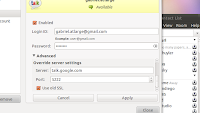
Fixing Google Talk on Ubuntu 10.10

what it looks like on my screen..
I love the unified chat/broadcast/email bits that are integrated into the main menu bar of Ubuntu 10.10 Marvelous Merkin.  For some reason tho, the current Google Talk settings don't work right out of the box.  Here's what you have to do, once you've got the chat app running:
  • In your contact list window, select Accounts from the Edit menu.
  • Click once on your busted Google Talk settings icon (on the left).
  • Click the triangle to expand the "Advanced" settings.
  • For "Server," supply "talk.google.com."
  • Leave the "Port" at the default, "5223."
  • Click to add a check to the "Use old SSL" option.
  • Click "Apply" and it should log you in just fine, now.

Fixing the Hibernate (&c) Problem on my Vaio running Ubuntu 10.10

Holy crap that was messed up.  I recently installed the alpha, then the beta, and now the release candidate of Ubuntu 10.10 Marvelous Merkin on my Sony Vaio M111AX.  Problem is, where my laptop could sleep, hibernate, restart and shutdown just fine under 10.04 Lucid, it was now just wedging with X mostly shut down but the desktop background still there ... taunting me.

It turns out the problem is in one of the the Ralink drivers.  And since this machine uses an Atheros for WIFI, I really don't need Ralink.

So I edited /etc/modprobe.d/blacklist.conf to add a few lines at the bottom:
blacklist rt2800pci
blacklist rt2800lib
blacklist rt2x00usb
blacklist rt2x00pci
blacklist rt2x00lib

It's likely overkill, as the rt2800pci is the particular one that causes the problem on this particular model of Sony.  But I'll bet other laptops with similar problems will benefit from this more inclusive list.  (And `lsmod | grep rt` will tell you if you have others, in case this set doesn't do it.)


After you edit the file, tell your system to reboot.  On this last reboot just after editing the file, you'll wedge like usual, but the subsequent ones will blacklist the ra2800 drivers correctly, and reboots will work just fine.  Phew!

Update 20110906:  Newer Ubuntu distributions starting with 11.10 (Obsequious Ostrich) include version 3.0 of the linux kernel.  Applying these instructions to a 3.0-based system will result in no wifi connectivity at all.  If you followed these instructions for a 2.6-based system that you intend to upgrade, you'll need to undo them when upgrading to a 3.0-based system.

Thursday, September 9, 2010

Installing the Ubuntu 10.10 Beta

Sometimes a product manager says "hey, why not?" and you don't have a good answer.  So you implement it.

I just kicked off an install of the beta of Ubuntu 10.10 Marvelous Merkin on my netbook and it does some things in parallel that totally make sense, but you never thought of it.  It starts partitioning your drive and copying files *before* it asks your timezone and keyboard layout -- it asks those configuration bits *while* mucking with your disks.  "Why not?"  Oh, did I mention, I'm writing this post on my netbook while Ubuntu is installing in the background?  This is a really subtle, but really kewl difference between this and other OS installs.  A focus on making your computer useful ...  even while you're installing a whole operating system.  I like it!

Tuesday, August 10, 2010

Processing 1.2.1 on Ubuntu 10.04

Okay, so I've got my copy of Getting Started with Processing, and I'm also now signed up for Arduino and Processing in Tandem.  So I'd better get Processing 1.2.1 running on my netbook, which is running Ubuntu 10.04 LTS Lucid Lynx.

The trick is that when you untar the processing package, nothing that comes out of the archive is executable.  It's a sensible default, but means you gotta specifically make things executable.  If you know how linux works, just chmod the "processing" script 755, chmod everything in the included java/bin/ as 755 and run ./processing from its directory.

For the rest of you, here's how I did it, in extra-verbose detail, step-by-step:
  • Download Processing 1.2.1 for Linux.
  • Reveal the downloaded file in a directory window.
  • (In Chrome: click "Show all downloads," find processing, click "Show in Folder")
  • (in Firefox: the download manager lists your files, right click processing and click "Open Containing Folder")
  • Drag the processing tgz file onto your desktop.  (For this example, at least...)
  • Right-click the tgz file on the desktop and select "Extract Here"
  • Open a new Terminal window.
  • (it's in the main menu: Applications -> Accessories -> Terminal)
  • In the Terminal, change directory into Desktop, and into the extracted processing dir.
  • (in this example: type "cd Desktop/processing-1.2.1" in the terminal, but your version number might differ.)
  • Make the processing script executable by all users.
  • (for this example: type "chmod a+x processing" in the terminal)
  • The package includes a compatible version of java, which also needs to be made executable.
  • (for this example: type "chmod a+x java/bin/*" in the terminal)
  • And now you can get processing to open by running it from a Terminal.
  • (in this example: type "~/Desktop/processing-1.2.1/processing &" in a terminal
  • And that's it!  In the future, I just open a Terminal and type "~/Desktop/processing-1.2.1/processing &" again.
It took me a second to figure out, so hopefully this saves someone else a little trouble.  And of course it might save me some trouble the next time, when I've completely forgotten what I did.  Because that happens.  Often.

    Monday, July 5, 2010

    Fixing wifi on a Sony Vaio M111AX running Ubuntu 10.04

    My cute new Sony Vaio M111AX couldn't see its wifi card, a RealTek 2860.  Luckily it's a popular netbook card, and after sifting through this ubuntu forum post, and ubuntu bug 541620, it turns out to be reeeeely simple.  When /var/log/messages (or dmesg) says this:

    Jul  5 14:38:17 smuurgh kernel: [   15.936530] !!! rt28xx Initialized fail !!!
    Jul  5 14:38:17 smuurgh kernel: [   16.409677] RtmpOSFileOpen(): Error 2 opening /etc/Wireless/RT2860STA/RT2860STA.dat
    Jul  5 14:38:17 smuurgh kernel: [   16.409686] Open file "/etc/Wireless/RT2860STA/RT2860STA.dat" failed!
    It doesn't even care what's in the file, just that it exists.  So if you create an empty file:
    sudo mkdir -p /etc/Wireless/RT2860STA/
    sudo touch /etc/Wireless/RT2860STA/RT2860STA.dat

    Your wireless card should appear as soon as you restart the network-manager:
    sudo service network-manager restart